

Every modern business leader knows that cybersecurity is essential to protect data, clients, and staff. Endpoints, cloud environments, networks, and sensitive accounts are all considered integral to a strong defensive strategy. But there is one factor that is commonly forgotten.
Have you secured your printers?
They are easy to forget about. The only time most staff think of the printer is when it’s malfunctioning, and it is not commonly mentioned by experts as a piece of equipment that needs to be secured. But this is precisely what threat actors are hoping for.
So what are secure printing solutions? And why do they matter?
Read more: Top 10 Sobering Facts About Business Security in 2025
How Your Printer Becomes an Attack Vector
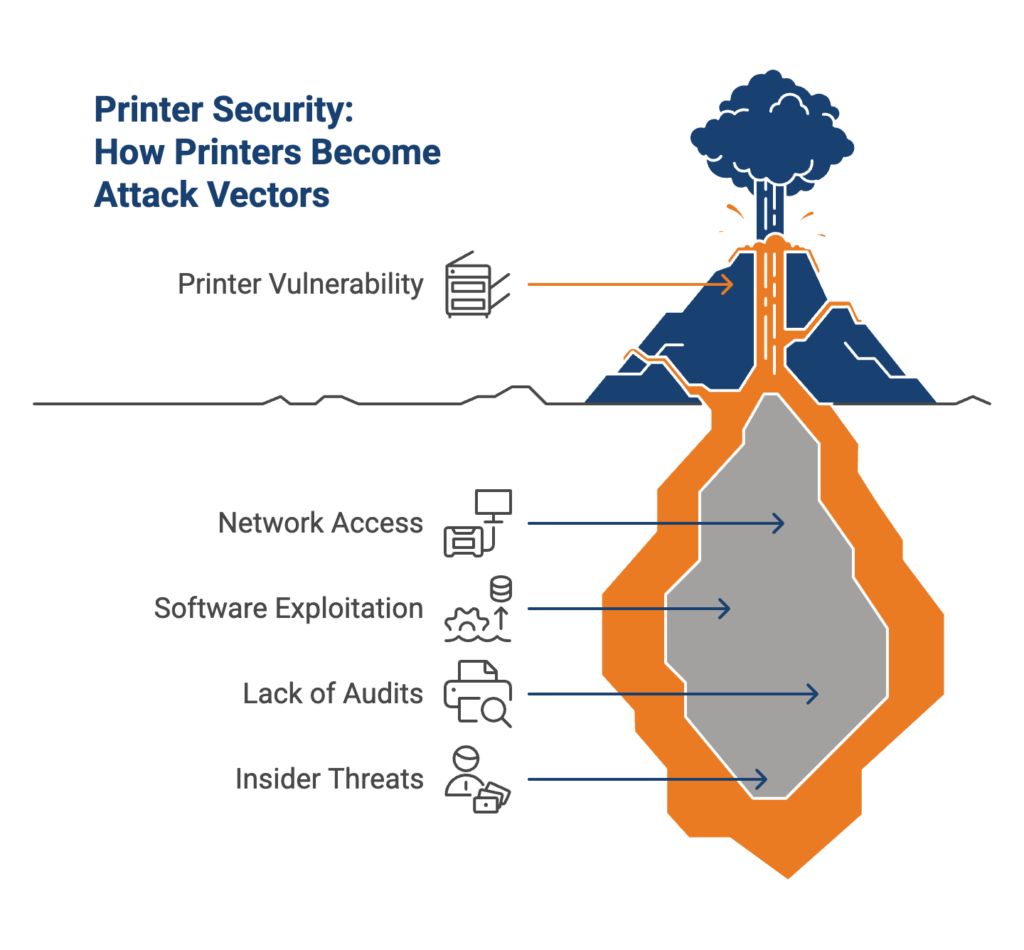
The modern office printer is far more than an output device. It is multifunctional, connected, and smart. Essentially, this simple piece of equipment has become a mini computer with its own software, storage, and network access. This means they are subject to exactly the same threats as any other endpoint.
Threat actors know this. They also know that printers are often left undefended, and as they struggle to break through modern security measures, many are starting to focus their attention on these weak points. Why would they waste hours of valuable time searching for passwords, when the printer is already connected to the company network and has been left entirely vulnerable? Once they gain access, they can easily use it as a starting point to:
- Intercept or reroute print jobs
- Install malware or viruses
- Travel laterally across your network, granting them easy access to the entire IT infrastructure
And because printers are typically left out of the cybersecurity audit, you may not even notice the breach until it is too late.
External threats are not all you need to worry about. While often underestimated, insider threats (accidental or malicious) can be just as damaging. If an employee walks over to the printer searching for their own documents, and accidentally picks up a confidential HR report, that is a data breach. If they happen to mention the contents of this report to another employee – or worse, someone outside the business – then you have a serious problem on your hands. Particularly if this information is considered protected under local or international data security laws, a small incident like this can ultimately lead to an audit and fine.
For these reasons, you cannot afford to neglect secure printing solutions.
Common Threats That Expose Your Printers
Your office printers can become an attack vector for a variety of reasons, including:
1. Default Credentials
Many modern printers come with usernames and passwords. If these are not changed from the default, or these credentials are compromised, threat actors can gain access just as easily as they would any other account. Consider how often the news reports stories of stolen password information, and it becomes clear how quickly this can turn into an issue.
2. Unsecured Print Jobs
When employees are busy and stressed, it’s common to print out a document and leave it sitting in the tray. It might stay there for hours, depending on the situation. In that time, any individual can access the information that document contains. As highlighted previously, this doesn’t have to be malicious (although this does also happen). A staff member can simply print their own document and then confuse the two, or unintentionally take both, when collecting theirs. In that single moment, any sensitive data in that document has been compromised.
3. Outdated Firmware
Just like a computer or Wi-Fi router, modern printers have firmware that requires regular updates. Many of these are important security patches. Failing to keep up with this task can leave enormous vulnerabilities that are easily exploited by threat actors.
4. Open Network Ports
Multiple printer ports are often left open for ease of access. Unfortunately, this can create a serious security risk. Anything can connect to these open ports, including while a different port is in use.
5. Unauthorized Access to Printer Memory
A little-known fact is that printers store data. They hold a temporary record of documents which are about to be printed, and some even provide the option to permanently save a given piece. This can be a useful feature, especially when the same document is regularly printed, but it also means this data can be accessed and stolen.
The Devastating Consequences of Failing to Set Up Secure Printing
Failure to implement secure printing practices can result in serious consequences for your business:
- Data Breaches: Once a threat actor has stolen sensitive data, they can hold it for ransom, sell it, or leak it to the public. This may result in extended operational disruptions and even harm to the individuals affected.
- Financial Losses: Recovering from a cyber-attack is expensive, and the long-term fiscal consequences can be even worse. Fewer clients, lawsuits, fines, and compensation will all set you back from your long-term goals.
- Reputational Damage: Trust is crucial for the success of your business. A single breach can destroy the strong relationships you have built with clients in an instant, making them more likely to go elsewhere. Once this trust is broken, it can be almost impossible to win back.
- Compliance Issues: Data protection laws are a constant threat looming over modern businesses, especially in highly-regulated industries such as law. If you’re found to have neglected cybersecurity, you could be audited or fined.
Fortunately, all of these negative outcomes are avoidable. Understanding how to set up secure printing practices is the first step.
How to Secure Printing for a Stress-Free Workday
1. Change Default Passwords
If usernames and passwords are in use, ensure that they follow best practices:
- Change default credentials
- Do not use information that is easily discovered (such as names, dates, or addresses)
- Use complex passwords and pins, and never repeat them
- Do not store password information in an accessible location (for example, a sticky note attached to the printer)
2. Enable Secure Print Release
While this is the default setting, your documents don’t actually need to print immediately. Secure print release is a system where they are instead held in a virtual queue, and then released upon receiving user authentication. This not only prevents sensitive information from being compromised, but also streamlines print management for the entire office.
3. Update Firmware Regularly
Where possible, automate firmware updates. If this can’t be done, create a schedule and stick to it. If your printers are older and no longer receive updates, this is a sign that you should start planning for an upgrade.
4. Control Access
Not every employee needs to access every printer or function. Access control is one of your most valuable tools. If possible, separate printers into “Sensitive” and “Non-sensitive” categories. Sensitive printers should be physically separated, and are the only location where confidential information can be printed. Employees should not have access to these devices unless absolutely necessary.
It is also important to disable unnecessary features, and close extra ports. These steps will make it more difficult to access the printer without authorization.
5. Set Strong Policies
Set clear, consistent rules that govern printer use and document security. Include:
- When and how to release print jobs
- How confidential documents should be printed (it’s a good idea to implement a policy that bans unnecessary printing of sensitive information)
- A timeframe within which printed documents must be collected from the tray
- Which security features should always be enabled
- Where printed documents can be stored, who can handle them, and how to handle disposal once they are no longer necessary
- When and how a printer can connect to the internet
- Which printer functionalities are approved for use
6. Monitor Print Activity
Track what is being printed, by whom, and when. A ledger that must be filled out each time a document is printed can be useful here. Any anomaly (for example, activity that does not appear to originate from the business or is not included in the ledger) should be carefully investigated, as this could be a warning sign.
7. Train Your Team
Ensure that all staff members understand the importance of secure printing practices, how to abide by the new policies, and what will happen if they are found to have broken the rules. Provide ongoing support for employees who need it, as there may be hiccups during and after the transition process.
8. Secure Mobile and Remote Printing
Remote connections can be a major risk factor. Limit these where possible, set rules outlining which devices can connect remotely to a printer (for example, laptops and desktops are allowed, but not cell phones), and disconnect printers from the internet when they are not being used remotely.
Secure Printing Services: What to Do When You Can’t Handle It Alone
These security measures may sound like they significantly complicate what should be a simple process. And for some businesses, they do. You may not have the necessary time, staff, or tools to properly manage printer security on your own, essentially forcing you to choose between a safe business and a productive one.
Secure printing services (also known as managed print services) offer a solution. Instead of micromanaging this critical area of your business, you hand these tasks over to an experienced third party. They take the pressure off your team by:
- Auditing your current print environment
- Identifying issues (which might include anything from poor resource management to security vulnerabilities)
- Implementing and managing solutions for these problems
This can improve not just your security, but your overall efficiency as well. You and your staff can focus on getting work done, while your service provider manages the day-to-day.
The Downsides of Managed Print Services, and How to Address Them
While they address many of the print issues businesses face, managed services introduce a new set of challenges. Addressing these early will be essential to ensure a successful partnership.
1. Less Oversight
Each time you outsource a task, you are sacrificing a certain degree of oversight in the process. Left unchecked, this can lead to issues in the future. It’s important to choose a provider who fosters a communicative environment, and keep an eye on what they are doing.
2. Growth Challenges
Some providers may make it difficult to change or customize their services, creating problems when your needs change (for example, as your business grows). Make sure yours offers multiple flexible service plans, and is receptive to how your needs might change in the future.
3. Cost Issues
When neglected, costs have an unfortunate tendency to skyrocket. This is true of managed services as well. Monitor what you pay for your services, and compare it against the benefits you receive. If at any point this is no longer balanced in your favor, discuss your options. It might be time to change to a different package, or even leave this provider entirely.
Choosing the Right Secure Printing Services
As you can see, the key is choosing the right provider. This will mitigate most potential problems and ensure success. Look for these attributes before making a decision:
- A Security-First Approach: If they also offer cybersecurity services, or otherwise demonstrate a strong commitment to data protection, this is a good sign. It shows that they understand the modern threat landscape and how to protect your business.
- Specialized Experience: Remember that not all experience is created equal. Find a provider who specializes in your industry, and in maintaining secure print practices.
- Past Clients: Ask for proof that they have succeeded before. Obtain case studies, check what their churn rate is (a high rate can be a warning sign that they don’t meet their clients’ needs), and ask for specific examples of companies they work with.
- Scalability and Customization: The right partner will not throw off-the-shelf solutions at you and hope they work. They will take the time to understand your business, your needs, and your plans for the future.
- Strong Communication: Don’t choose the provider who takes an entire week to respond to your emails. Communication should be fast, understandable, and entirely transparent. When they cannot address a concern immediately, they should be able to explain why and provide a timeframe.
These traits will set your partnership up for success, thus ensuring stronger printer security.
FAQs
How Do I Know if My Printers Are Secure?
Perform regular audits to identify potential problems with your printer security. Check access controls, activity, connections, and credentials. If anything appears out of place, develop an improvement plan.
How Expensive are Secure Print Services?
Typically, managed service providers only charge a fixed monthly fee. In addition, they can save your business a significant amount of money by ensuring resources are used efficiently and preventing cyber-attacks. However, the exact price will vary based on your provider, business, and print needs.
Does My Small Business Need to Worry About Printer Security?
Yes. Small businesses are just as vulnerable as larger corporations. In fact, they are often specifically targeted by threat actors, as they tend to have fewer security measures on average. The consequences of a breach are also far more severe the smaller your company is.
Are Some Printers Safer Than Others?
Yes. If possible, choose a model that offers secure print features such as password authentication and a print release option. The ability to disable certain functionality and automate updates is also desirable.
Is There Anything Else I Can Do to Protect My Printers?
Yes. Anything that protects your business will also reduce your chances of a printer becoming an attack vector. Securing and segmenting networks is a great way to prevent a compromised device from impacting your entire business, in the event that a printer is breached. However, it is still important to secure your printers specifically.
Secure Printing Solutions: Your Key to a Safer, More Efficient Office
Your printer is one of the most dangerous security risks in your office – but it doesn’t need to be. The right security solutions will address many threats and vulnerabilities that could otherwise lead to a severe breach, protecting your data and finances. Whether you choose to outsource or manage it yourself, preparation is the key to a safer, more efficient future.
At Com Pro, we understand that security is both a pressing concern and a major source of stress for small businesses. That’s why we’ve made it our mission to simplify this complex topic. Get started with 10 easy ways to strengthen your security.